
Map Loox reviews to the correct Shopify product handle
Choose between a one-export mapping and editing handles saved in a Loox task.
Map Loox reviews to the correct Shopify product handle
Map one destination product
Open the product in the destination store. For a URL ending in /products/stoneware-mug, the handle is stoneware-mug. It identifies the product in that store; two stores may use different handles for the same item. Match the review to the actual product before mapping it.
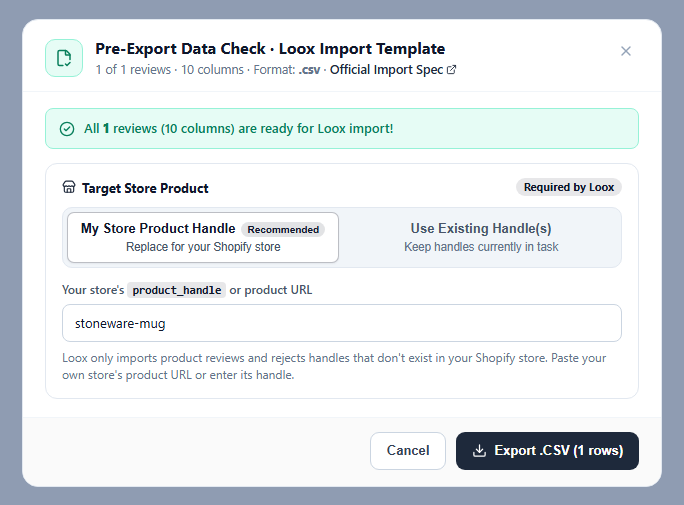
In the workspace select the matching rows, choose the Loox template and export. In the pre-export check, choose My Store Product Handle and enter the destination handle or paste the product URL. This mapping applies to the exported rows. Open the resulting CSV and check the first and last values in product_handle.
Keep separate products separate
A single custom handle is applied across the export. For a mixed task, filter and export one product at a time, or prepare the correct handles in the workspace and choose Use Existing Handle(s). The Loox Edit → Product Handle tool changes the saved task data. Export an all-fields copy first if you need the original mapping.
If Loox returns Product not found, look up the destination product again and confirm it is active. A filled-in handle can pass a local presence check yet fail the destination store's lookup. Correct the rejected rows and use the import error file to verify which rows need another attempt.
Related guides · Export Loox reviews to CSV or Excel · Resolve Loox CSV validation and import errors
Sources · Loox · Importing Reviews Using a Custom File · Loox · Fixing Errors on Spreadsheet Imports