Resume an interrupted Loox review export
Recover saved progress and distinguish a partial task from a fresh capture.
Resume an interrupted Loox review export
If the progress panel says Retrying and displays a countdown, leave the source tab open. The extension is already retrying a network or rate-limit response. If the panel says progress is saved and offers Retry, use it there or return to the source later.
Find the unfinished source
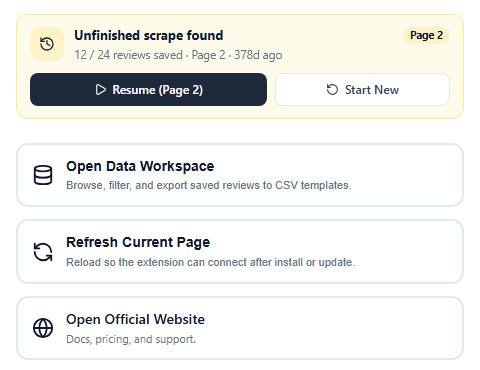
From Open Data Workspace, search Scrape Tasks by page title, handle or URL. Check the stored count and open the task's source page. Return to the same product and detect its widget again. With a matching resumable task, the popup shows Unfinished scrape found, a saved count and a page indicator.
Continue from the checkpoint
Use the resume action on that card. Start Fresh begins a fresh scrape; use it when you actually want a new capture. If multiple sources are offered, check the source before making the choice. If no resume card appears, inspect the existing task before starting over. A different widget URL or product can lead to a different match.
After collection, refresh the workspace task list and inspect Total Saved. A file downloaded while the task was incomplete is a snapshot; export again to include subsequently saved rows. If the source no longer loads, retain the partial task and export the available records before deleting anything.
Related guides · Fix “no reviews found” on a Loox product page · Export Loox reviews to CSV or Excel
Sources · Loox Reviews Exporter · Browser Addons · Widget detection